/eh/2025-01-08/173633966714069467/picture.png)

/eh/2024-12-24/173503345348979036/Favorite-Icon.png)
/eh/2025-07-08/1751962110204480194/picture.png)
/eh/2025-06-21/1750485478958537574/countryInfoIcon.png)
/eh/2025-06-21/1750485741321434291/Hi-Sign-in-My-Nihao.png)
/eh/2025-06-21/1750485837193896318/cart.png)
/eh/2025-06-21/1750485968202533847/cart.png)
/eh/2025-04-17/1744862476612819675/hot-img.png)
/eh/2025-11-07/1762504524550532584/header-icon.jpg)
/eh/2025-07-07/1751875582852206790/header-icon.png)
/eh/2025-07-07/1751875587886277738/header-icon.png)

Best in 7 days


Shopping security
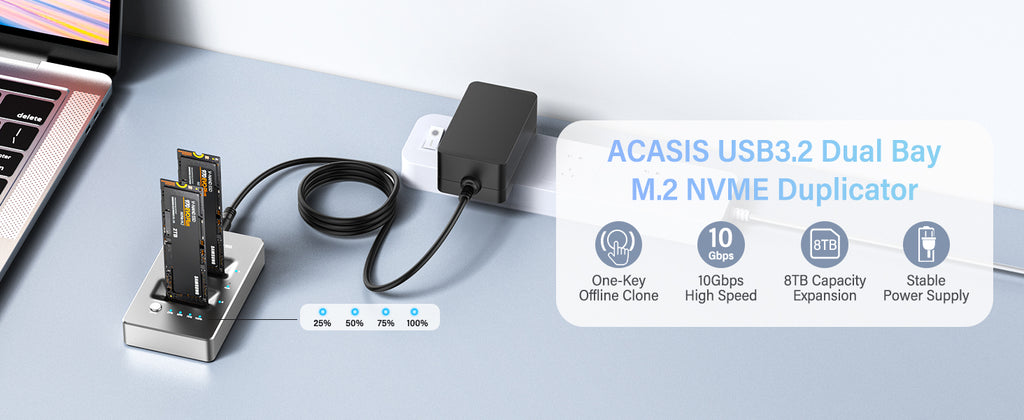
Acasis Dual-Bay NVMe Docking Station, Lay-Flat External Hard Drive Docking Station for M2 SSD Key M, Support Offline Clone Function and Tool-Free Installation.
Off-line Cloning, Fast Heat Dissipation, Unique Shape
Material: Aluminum alloy
Transmission Speed: 10Gbps (Theoretical speed)
Compatibility: M Key & (M+B) Key
USB Interface: USB3.2 Gen2
Compatible Systems: Windows/Mac/Linux
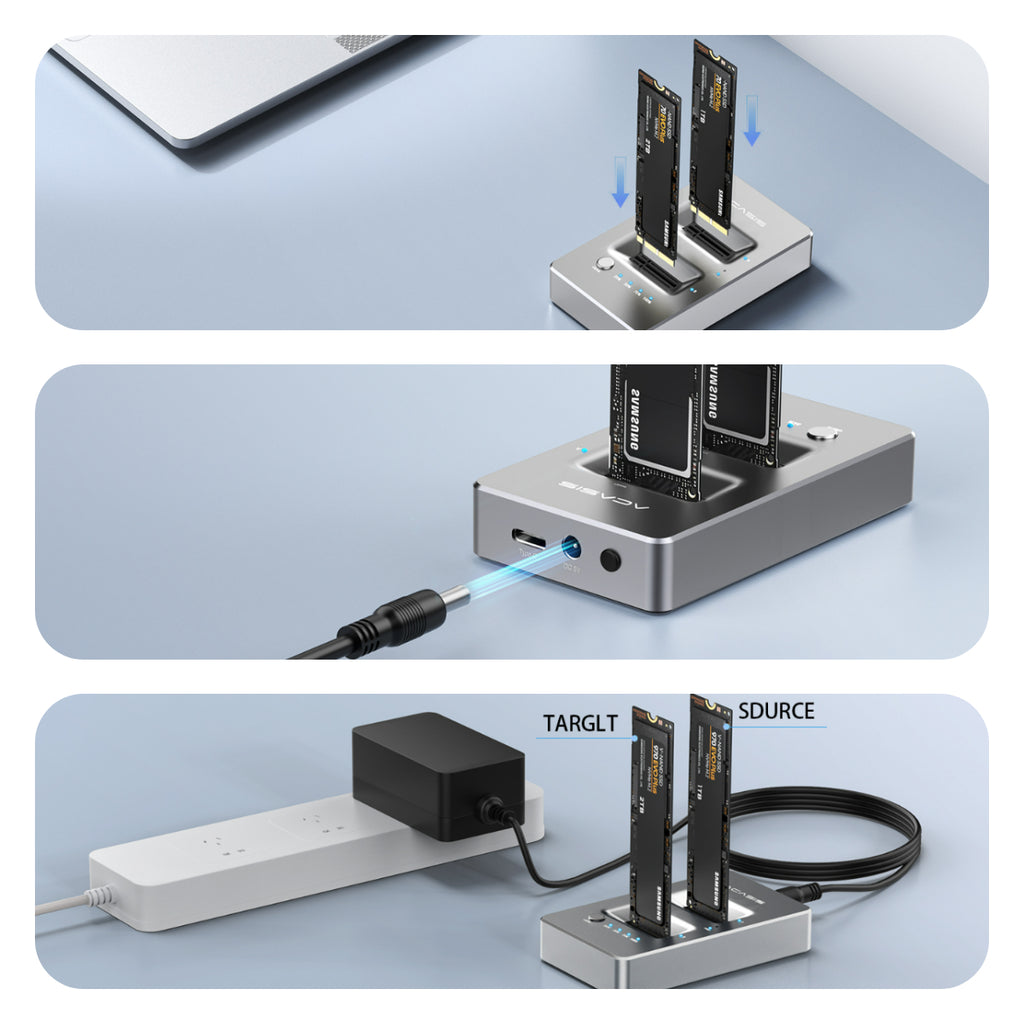
1. To access NVME with a PC: Once you attach power and Type-C USB, you're ready to go. Carefully insert the NVME SSD into the slot(s) of your choice and push the power button on the back of the dock. Wait a few seconds, and the dock should enumerate in Windows. Depending on the state of the SSD, you'll either need to go to Drive Manager to initialize and format the SSD's, or they could just pop-up in Explorer, ready to use.
2. For Standalone Duplication: Plug the target SSD into Slot B (the front of the dock, closest to the clone button), and plug the source SSD into slot A (the end were the power adapter connects). Target SSD capacity must be Larger than Source SSD capacity. Press and hold the power button for 3-5 seconds to begin the clone process. LED's on the front top of the dock indicate clone progress - 25%, 50%, 75% and 100%.
Warm Tips
● Check if your SSD interface is clean before inserting into slot.
● Insert and remove your SSD carefully only when the power is off.
● Do not tilt or bend your SSD during its installation or removal. Never force it into the slot.
● When using or duplicating a drive, especially a large one, it's best to use with a cooling fan for better heat dissipation.
● A brand new SSD needs to be formatted and initialized on the computer before it can be used.
 |
USB 3.2 Gen2 10Gbps Data Transmission This product provides instant access to your M.2 NVMe SSD at reliable speeds. According to the Acasis Lab, R/W speeds can reach up to 1041MB/S and1034MB/S respectively. |
 |
Offline clone up to 8TB SSD whole copy function without PC |
Please note:
1. Do not connect to the computer during clone.
2. SSD condition: If there is a bad sector in the SSD, copying may stop. Scan the SSD once before copying to make sure there are no bad sectors.
|
Designed for Multi NVMe M.2 SSDs ACASIS NVMe duplicator support two M.2 nvme ssds(2230,2242,2260,2280). NOT support SATA SSDs. Compatible with multiple operating systems, such as Windows, macOS and Linux. |

|
|
Excellent Heat Dissipation Compact, freestanding design making dissipates heat and exhaust efficiently, aluminum construction protects the drive from overheating and reduces vibration. |
 |
Step 1
1. Before cloning, disconnect the USB cable from the device. 2. Plug the source M2.NVME SSD in Slot A and the target M2.NVME SSD in Slot B.
Note: The capacity of Target SSD needs Larger than the source SSD. Target>Source
Step 2
1. Connect the power adapter to the enclosure 2. Press the power button.
3. Hold the clone button for 3-5 seconds until LED indicator begins to flash.
Step 3
The LED indicators show the cloning process from 25%,50%,75% and 100%.
When all four LEDs stop flashing, the cloning is finished. This process may take a long time which mainly depends on the capacity of SSD.
Ships within 48 hours · Estimated delivery Jun 30 - Jul 5
US$40
Get nowSign up to your membership to get coupons up to
15%
Get nowOpportunity to enjoy order discount up to 15% off
Top-Converting Item to Boost Your Average Order
![Lunasea High Output LED Utility Light w/Built In Switch - White [LLB-01WD-81-00]](https://cdn.shopify.com/s/files/1/0550/4407/9795/products/52381XL.jpg?v=1759503762)


![Shedinja (11/97) [EX: Dragon]](https://cdn.shopify.com/s/files/1/1198/4500/files/89117_9bd7531f-918c-45c6-92ba-ca4963e9f3d2.jpg?v=1773790123)
![Houndoom (14/147) [Aquapolis]](https://cdn.shopify.com/s/files/1/1198/4500/files/86202.jpg?v=1773408204)
![Energy Switch (120/147) [Aquapolis]](https://cdn.shopify.com/s/files/1/1198/4500/files/85253.jpg?v=1773790030)
![Queen - Flash Gordon [Regular Edition] - Japan SHM-CD](https://cdn.shopify.com/s/files/1/0568/8482/2076/products/4988005667939.jpg?v=1655515029)
![Team Aqua's Kyogre (3/95) [EX: Team Magma vs Team Aqua]](https://cdn.shopify.com/s/files/1/1198/4500/files/89788.jpg?v=1773816689)
